Solutions for the In-Between.
Workflow automation for local government, utilities, and public works.
Choose the packaged path that matches your operational break: Field to Finance, Service to Work, Plan to Work, or Aviation Data Operations.
Start where the workflow breaks first.

Common Symptoms
Plans live in one place. Execution happens somewhere else.
For cities, towns, utilities, and public works teams, plans rarely move in a straight line.
An asset manager identifies a priority. A capital plan is approved. A budget is assigned. A project is created. An inspection reveals condition data. GIS holds the location and asset context. A work order may need to be created. A field team eventually does the work.
Then finance expects the cost to match the plan.
Leadership expects to know what changed, what was completed, and what remains at risk.
But the systems in the middle do not always agree.
Local government and utility teams often rely on spreadsheets, manual status updates, disconnected project trackers, copied data, exported reports, and staff knowledge to explain how plans became work.
This is not just a planning problem; it is an execution dilemma.
Common symptoms
Capital plans do not connect cleanly to actual work
Asset priorities are not consistently converted into projects or work orders.
Budgets, projects, costs, and field activity are tracked separately.
Deferred work is difficult to explain or defend
Inspections and condition assessments do not reliably trigger the next action.
GIS, asset management, CMMS, ERP, and reporting behave like separate worlds
Planned work and completed work require manual reconciliation.
Leadership receives reports that still need interpretation.
The plan made it through approval. It did not make it cleanly into reality.
Plans live in one place. Execution happens somewhere else.
Every disconnected handoff creates doubt somewhere.
For cities, towns, utilities, and public works teams, plans rarely move in a straight line.
An asset manager identifies a priority. A capital plan is approved. A budget is assigned. A project is created. An inspection reveals condition data. GIS holds the location and asset context. A work order may need to be created. A field team eventually does the work.
Then finance expects the cost to match the plan.
Leadership expects to know what changed, what was completed, and what remains at risk.
But the systems in the middle do not always agree.
Local government and utility teams often rely on spreadsheets, manual status updates, disconnected project trackers, copied data, exported reports, and staff knowledge to explain how plans became work.
This is not just a planning problem.
It is an execution problem.
Common symptoms
Capital plans do not connect cleanly to actual work
Asset priorities do not always become work orders
Budgets, projects, costs, and field activity are tracked separately
Deferred work is difficult to explain or defend
Inspections and condition assessments do not trigger the right next action
GIS, asset management, CMMS, ERP, and reporting behave like separate worlds
Planned work and completed work require manual reconciliation
Leadership sees reports that still need interpretatio
The plan was approved. The outcome is still uncertain
Plan to Work creates a governed path from priority to outcome.
Spatial DNA helps teams define, connect, validate, and control the handoffs between asset plans, capital programs, maintenance strategies, budgets, projects, inspections, GIS, work orders, ERP, finance, field execution, and reporting.
The goal is not to replace the systems your teams already use.
The goal is to make sure the right plan becomes the right work, with the right rules, asset context, ownership, cost visibility, and outcome tracking.
Plan to Work helps teams control:
Asset priority and condition data handoffs
Capital plan to work order creation rules
Budget, project, cost code, and funding alignment
Planned maintenance and renewal workflows
GIS asset context and work package validation
Project status, field updates, and completion tracking
Deferred, changed, or cancelled work governance
Reporting readiness for planning, operations, finance, and leadership
Turn infrastructure plans into trusted work without depending on spreadsheets as the control system.
Built for the teams caught between planning and execution.
Plan to Work is designed for infrastructure organizations where plans, assets, budgets, work, cost, and outcomes all need to line up. .
Best-fit teams
Public Works
When maintenance plans, capital programs, asset priorities, work orders, crews, and field execution need to move as one controlled process.
Utilities
When asset renewal, inspections, maintenance strategies, field activity, and financial outcomes need governed handoffs.
Asset Management Teams
When asset condition, risk, priority, and lifecycle plans need to connect to the work that actually happens.
Planning and Capital Programs
When approved plans, projects, budgets, and delivery timelines need clearer visibility into execution.
Finance and Budget Teams
When planned investments, actual costs, project codes, and reporting need to reconcile without manual cleanup.
IT, GIS, and Systems Teams
When capital planning, GIS, CMMS, ERP, asset management, and reporting tools need cleaner integration patterns
Where Plan to Work usually starts.
Capital plan to work order
Turn approved capital plans, maintenance programs, or renewal priorities into work orders, projects, or work packages with validation and controlled handoffs.
Search-aligned phrase
capital plan to work order
Asset priority to execution
Connect asset condition, risk, priority, and lifecycle planning to the work that needs to happen in the field.
Search-aligned phrase
municipal asset management software integration
Budget for project tracking
Align budgets, funding sources, project codes, cost codes, and actual work activity so financial reporting reflects execution.
Search-aligned phrase
capital planning software for local government
Inspection of planned work
Use inspection results, condition assessments, and field observations to trigger the right follow-up work.
Search-aligned phrase
planned maintenance workflow
Planned vs actual reporting
Show what was planned, what changed, what was completed, what was deferred, and what outcomes were achieved.
Search-aligned phrase
planned vs actual work tracking
Connect the systems that already manage plans and work.
Spatial DNA can be positioned around the handoffs between the systems local government and utility teams already use.
System categories to reference
- Municipal asset management software
- Capital planning systems
- GIS
- Work order management systems
- CMMS
- Public works software
- Project management tools
- ERP
- Finance and budget systems
- Inspection and field mobility tools
- Reporting and analytics tools
- Document and record management systems
Map. Define. Control.
You do not need to replace every system to fix Plan to Work. You need to control what happens between them.
Map the handoff
Map asset plans, capital programs, budgets, projects, inspections, GIS, work orders, field updates, ERP, and reporting currently move.
What this reveals
Where the process depends on spreadsheets, copied data, manual status updates, disconnected reports, or one person’s knowledge.
Define the rules
Define what must be true before a plan becomes work and before work can be assigned, updated, deferred, completed, or reported.
What this creates
A shared operating model for asset management, planning, public works, utilities, IT, GIS, finance, and leadership.
Control Execution
Use automation, validation, APIs, rules, monitoring, and partner delivery to keep the handoff governed.
What this enables
Cleaner work creation, better asset context, clearer budget alignment, fewer reconciliation cycles, and planning reports that teams can trust.
Built for complex infrastructure handoffs.
Spatial DNA works in places where infrastructure planning, operational systems, geospatial data, field execution, finance, and public accountability meet.
Planning to Work is not a generic planning story. It is about helping public-sector infrastructure teams bring discipline to the operational layer where plans become action.
This is especially important in local government and utility environments, where the same workflow may involve asset management, public works, utilities, IT, GIS, finance, planning, procurement, operations, and leadership.
Spatial DNA helps teams move from disconnected planning processes to governed, execution-ready work.
From plan approved to outcome delivered.
When Plan to Work is controlled, teams spend less time explaining the gap between strategy and reality and more time delivering the work that matters.
Before
- Plans sit apart from work execution
- Asset priorities do not always work
- Budgets and actual activity are difficult to reconcile
- Project status needs manual updates
- GIS and asset records fall behind reality
- Deferred work becomes hard to track
- Reports need manual explanation
After
- Plans convert into clearer work packages
- Asset priorities carry the right context
- Budgets and work activity stay better aligned
- Field progress is easier to track
- GIS and asset records stay better connected
- Deferred or changed work is easier to explain
- Planning reports become easier to trust
The plan is understood, the work is connected, and the organization can see what changed
Start with one Plan to Work workflow.
Bring one workflow where plans exist, but execution does not line up cleanly.
Spatial DNA can help your team map the handoff, identify where plans lose trust, define the rules, and create a practical path to control.
Good diagnostic candidates
- Capital plan for work order
- Asset priority to field execution
- Inspection of maintenance plan
- GIS asset list to work package
- Budget for project execution
- Planned maintenance to actual completion
- Deferred work tracking
- Work completion back to asset plan
One of the 5 Dysfunctions of Automation: no feedback loop.
Automation does not fail only because systems are old. It often fails because the feedback loop was never defined.
Who owns the plan?
Which system turns priority into work?
What data is required before work begins?
What happens when a project changes?
Who approves deferrals?
How does completed work update the asset plan?
How does the organization know the investment produced the intended outcome?
Plan to Work breaks when these questions are left to habit, memory, or spreadsheet updates.
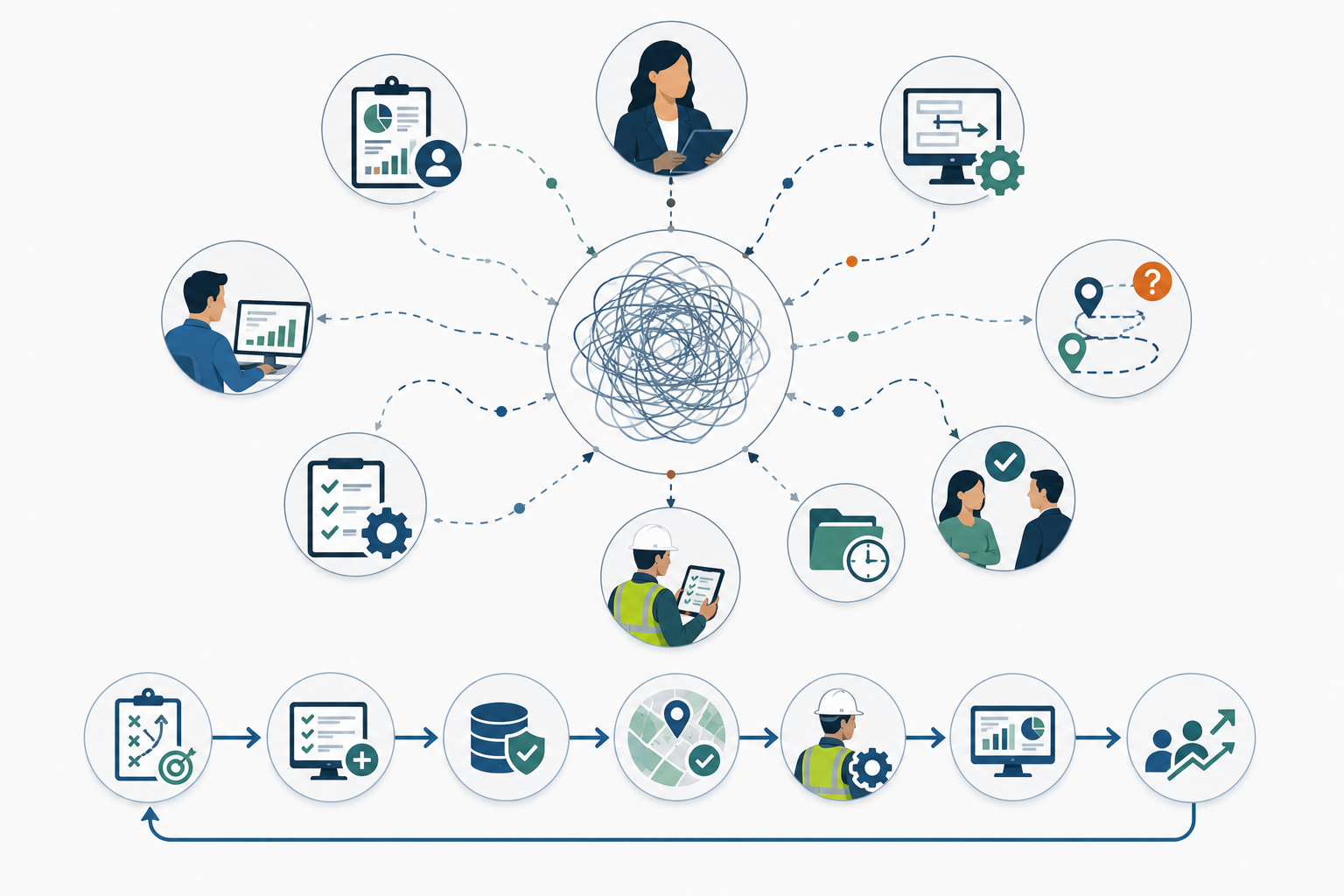
What is Plan to Work?
Plan to Work is the process of turning asset plans, capital programs, budgets, inspections, maintenance strategies, and infrastructure priorities into the right operational work through governed workflows, work orders, field updates, cost tracking, and reporting.
Who is Plan to Work for?
Plan to Work is for cities, towns, utilities, public works departments, asset management teams, planning teams, finance teams, IT teams, GIS teams, operations leaders, and infrastructure organizations that need plans and execution to align.
Does Spatial DNA replace asset management, capital planning, GIS, or public works software?
No. Spatial DNA should be positioned as an execution control layer that connects, governs, validates, and controls the handoffs between existing systems such as asset management software, capital planning tools, GIS, ERP, CMMS, work order management, finance, and public works software.
What problems does Plan to Work solve?
Plan to Work helps reduce disconnected planning, manual project tracking, unclear work ownership, missing asset context, budget-to-actual reconciliation issues, deferred work confusion, and reporting that teams do not fully trust.
Why does Plan to Work matter for public works?
Public works teams need plans to become clear, actionable work. When plans do not connect to field execution, teams lose visibility into progress, budgets, asset priorities, deferred work, and public outcomes.
What systems are involved in Plan to Work?
Typical systems include municipal asset management software, capital planning systems, GIS, CMMS, work order management software, public works software, ERP, finance and budgeting systems, inspection tools, field mobility systems, and reporting platforms.
What is the first step?
The first step is to map one workflow where plans do not become trusted work. From there, teams can define ownership, required data, system handoffs, validation rules, status updates, and reporting logic.
Ready to turn plans into trusted execution?
Start with the handoff that creates the largest gap between planning and reality.
Answer a few questions, identify the Plan to Work gap, and get a clearer path from disconnected plans to trusted execution.